
Help centre
How can we help?
Answers about your account, profiles and cards, plans and billing, and NFC cards and shipping. For anything else, email support@linkist.ai.
Getting started
How do I create an account?
Select Get the App to create your free Linkist profile.
Do I need a password?
The sign-in screen asks for your email address or mobile number and sends a one-time code that expires. You would need to set up your account with a password. For future logins you can enable biometrics so you don’t need to enter your password.
Where do I sign in?
The PRM app signs in at prm.linkist.ai/UnifiedAuth, which is where Sign in leads. Get the App opens the same sign-in screen and signs existing members in, and Get NFC Card opens the store at prm.linkist.ai/store/start.
Should I use my email or my mobile number?
Your account is linked to your email. Once set up, you can use your mobile number, email or biometrics (when enabled) to log in.
Do I need a card to start?
No. The Essential plan is free and needs no NFC card. You can add a card any time.
Is Linkist free?
The Essential plan is free for as long as you like. Enhanced, Pro and Team are paid, and every NFC card includes PRM Essential.
What is a Personal Relationship Manager?
A PRM organises relationships rather than deals. Your contacts, meeting context, priorities and follow-ups live in one place, focused on who matters and what deserves action.
How is Linkist different from a contact app or a CRM?
Contact apps store people and CRMs manage deals. Linkist helps you manage relationships: who matters, who fits what you are looking for, and what to do next.
What are the three stages?
Capture and share, Build relationships, Act and grow. Capture the people you meet, find the ones worth your attention, then know what to do next.
Is there an iPhone or Android app?
Both iPhone and Android apps are coming soon.
Do I have to be 18?
Yes. The terms require users to be at least 18 (T 3), and the sign-in screen asks you to confirm it.
Can I use Linkist on behalf of my company?
Yes. On the Team plan (the Teams plan in the Terms), the person who buys it agrees to the terms for the company and confirms they are allowed to, and the company is then responsible for everyone it adds (T 13.1). Enterprise is upcoming; when it launches it will be sold under a separate signed agreement (T 1).
Capture
How do I add a contact?
Through an NFC tap, a QR code, a business-card scan, your phone contacts, a CSV or VCF file, or by typing it in.
What does the card scan do?
It reads a paper business card with the camera and turns it into a contact record. Essential includes 5 scans a month, Enhanced 20, Pro and Team unlimited.
Can I import my existing contacts?
Yes. Import from your phone address book or from a CSV or VCF export of another tool. Importing is optional and you confirm you have the right to bring those contacts in.
What can I save with a contact?
The document lists contacts you save, scan or import, where you met, and your notes, reminders and tags (P 2). Photos of scanned business cards are deleted after 30 days unless you keep them with the contact.
What are voice notes for?
Recording where you met and what mattered while it is fresh, so the context is saved with the contact.
What is AI Enrichment?
It fills in missing professional details on an incomplete record from public business sources and data providers Linkist has an agreement with, where you have switched it on (T 9). Part of Pro and Team.
Does the other person need Linkist to give me their details?
No. When someone taps your card or scans your code they see your live profile and can send their own details; if they use Linkist too, the meeting is captured on both sides.
Can I export my contacts?
The plan comparison lists export from Enhanced upwards. Separately, the document gives every user the right to see and download their data (P 11), and to download it before closing the account (T 15).
Profiles and cards
What is a digital business card?
A live profile with your photo and details that you share by QR code, link, email or SMS. Every plan includes one, and it updates wherever it has been shared.
What can my profile show?
Job title, company, department or role, a biography, a photograph, a company logo, website links, your LinkedIn address and other professional or social links you choose to add. Essential shows a limited set of fields; a bio, social links, services, products and certifications start at Enhanced.
How many profiles can I have?
Essential has 1 personal profile. Enhanced has 3 (1 personal, 2 business). Pro has 5. Team gives each user 5.
Can I get a personal URL?
Yes, on Enhanced and above. The public profile address takes the form linkist.ai/me/yourname.
Is my profile public?
Anyone with your link, QR code or card can see the parts of your profile you make public; you choose what is public (T 11). You are responsible for making your profile accurate and lawful (T 5).
Can I change my profile after my card is printed?
Yes. The card points at your live profile, so edits appear the next time anyone taps or scans it. Nothing needs reprinting.
What is a lead capture form?
A form on your profile where a visitor leaves their details for you. The plan comparison lists it from Enhanced upwards.
Can I add my card to Apple Wallet or Google Wallet?
Coming soon.
Find
What is Natural-Language Search?
Search your network with what you remember, in normal words, rather than an exact name. For example, the fintech founder you met at GITEX.
What is an ICP?
An ideal customer profile: a description of who you are looking for. ICP Matching shows which contacts fit it and, on the home screen, how many matches were found. Part of Pro and Team.
Where does ICP Matching get its information?
From the profile data, contact details, notes and history you keep in Linkist, plus public business sources and data providers Linkist has an agreement with, where you have switched AI Enrichment on (T 9). It is an optional AI feature, off until you switch it on.
What is Network Ask?
Post what you need and Linkist finds relevant people in your network, or a trusted path to someone one connection away. Part of Pro and Team.
What does Relationship Heat Map show?
Which relationships are warming up, cooling down or cold, so you know who needs attention.
What is Network Strength?
A read of how strong your network is overall. One of the scores the optional AI features produce (T 9, P 2).
Act
What are Top Actions?
The most important things to do today, listed when you open Linkist. Part of Pro and Team.
What is the Weekly Planner?
A view for planning the relationships and opportunities you want to move this week, so follow-ups are scheduled rather than remembered.
What is a nudge?
A timely prompt before a follow-up slips, such as a reminder that you met someone at an event and have not followed up.
What are Smart Signals?
Changes about a contact that deserve a reaction, noticed for you by the optional AI features (T 9). Every suggestion shows how confident it is and why (P 6).
What is a warm introduction?
An introduction through someone you both know, found by Linkist when the person you need is one connection away.
Can Linkist draft my follow-up?
Yes. AI Follow-up drafts a message from the context you saved. You review it and decide; Linkist sends nothing unless you tell it to send that message (T 4).
Can I turn notifications off?
Yes. Optional messages such as marketing are asked for separately and can be switched off at any time in Settings > Privacy (P 5), and you can schedule the nudge cadence per contact. Service messages such as codes, order and security notices still arrive because the service needs them (P 3).
Teams
What does the Team plan add?
Everything in Pro for every user, contact sharing across the team, a centralised admin console, company branding on cards and a team directory. Minimum 5 users.
What happens to contacts when someone leaves?
Personal contacts stay with the person. Team-shared contacts and their relationship history remain with the authorised team, so relationship value stays inside the company.
Who manages a team?
An administrator, through the centralised admin console listed in the plan comparison: members, shared contacts and company branding on every card.
Can a team member keep private contacts?
Yes. Personal contacts stay personal, and Team Admins cannot see them. Contacts collected with a Team card, created in the team space or shared into it are team contacts (T 13.4).
How is a team billed?
$5 (AED 20) per user a month with a minimum of 5 users: $25 a month or $250 a year for 5 users (AED 100 or AED 1,000), then $5 (AED 20) a month or $50 (AED 200) a year for each additional user.
Plans and billing
What do the plans cost?
Essential is free. Enhanced is $2 (AED 8) a month or $20 (AED 80) a year. Pro is $10 (AED 40) a month or $100 (AED 400) a year. Team is $5 (AED 20) per user a month with a minimum of 5 users: $25 (AED 100) a month or $250 (AED 1,000) a year for 5 users, then $5 (AED 20) a month or $50 (AED 200) a year for each additional user.
Which plan has ICP Matching?
Pro and Team. Enhanced adds profiles, templates and lead capture; Pro adds the AI and relationship intelligence features.
Is there an Enterprise plan?
Not yet. Enterprise is upcoming. Single sign-on, CRM and HRMS integration and product customisation are planned for it.
Which currency am I billed in?
Prices are listed in AED and US dollars; the USD / AED switch beside the prices shows either, and the store checks out NFC cards in AED. The terms say prices are shown on the Pricing page and at checkout, with taxes added where they apply (T 12), so check the currency at checkout.
Where do I manage my subscription?
In the billing hub at prm.linkist.ai, which handles plans, AI credit top-ups, invoices and card orders.
Do subscriptions renew automatically?
Yes. Paid plans renew automatically for the same period unless you cancel (T 12). Cancel before the renewal date if you do not want the next period.
Can the price of my plan change?
Yes, with at least 30 days’ notice; a price increase applies from your next renewal (T 12). Yearly plans get a renewal reminder at least 30 days before.
Who processes payments?
Third-party payment providers such as Stripe. Linkist does not store full card numbers.
What are AI credits?
Some AI actions draw on credits, sold as top-ups in the billing hub. What one credit buys is not published yet; the app shows the figure when you buy.
Where are my invoices?
In the billing hub at prm.linkist.ai. The document keeps payments and invoices as long as tax and accounting law requires (P 10).
NFC cards and shipping
Which NFC cards are there?
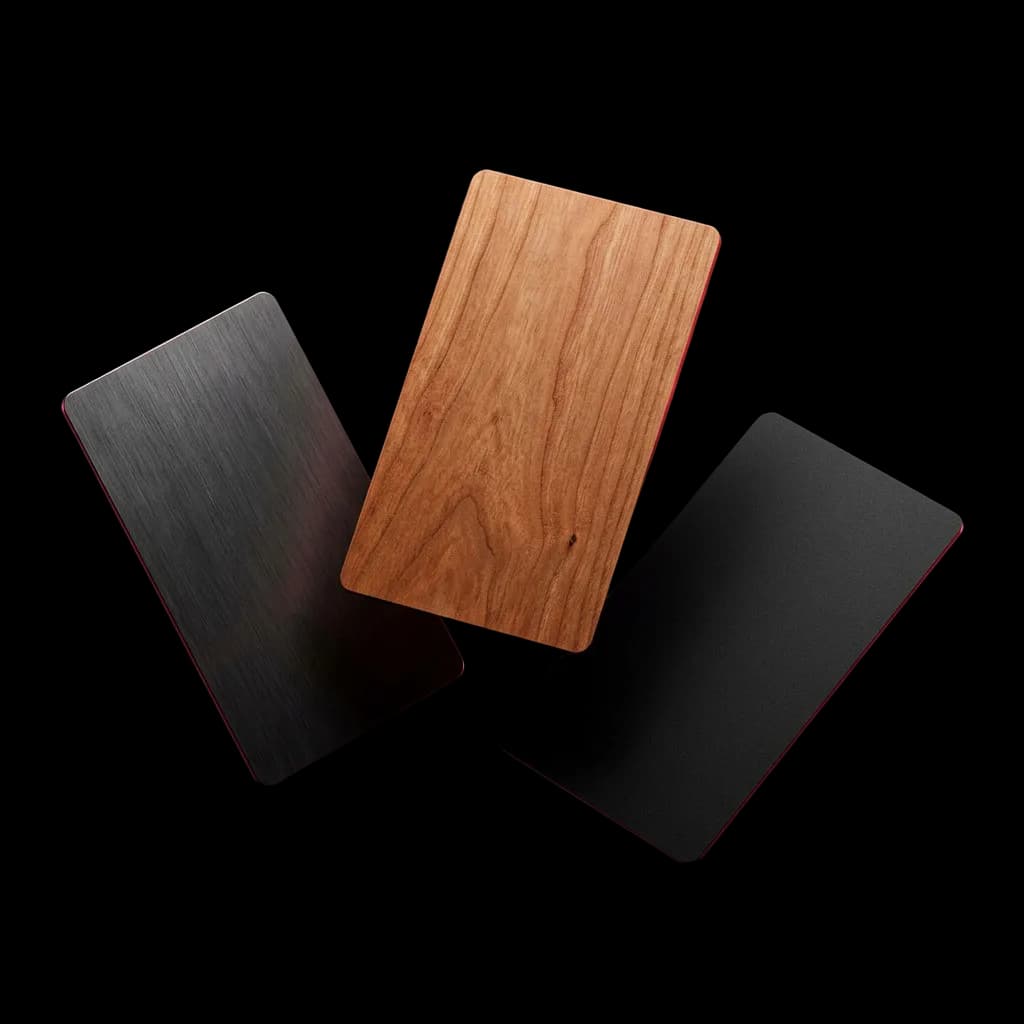
Starter, with no customisation, at AED 75 ($20) in PVC, AED 95 ($25) in cherry wood or AED 200 ($55) in brushed metal. Signature, with your name and logo, at AED 95 ($25), AED 125 ($35) or AED 240 ($65). Every card includes PRM Essential.
Which materials, colours and patterns?
PVC in white or black with four patterns (Minimal, Geometric, Wave and Crystal), cherry wood, and brushed metal in silver or black with the same four patterns.
What is printed on a Signature NFC card?
Your name and logo. You are responsible for what is printed on your card and for checking the proof before printing (T 14). You can change or cancel an order within 24 hours; after printing starts it may not be possible.
What does a tap do?
The NFC card opens your live profile on the other person’s phone. They save your details and, if they use Linkist, you keep the context of the meeting too.
Does the NFC card work with every phone?
It needs a phone with NFC switched on. The terms do not promise that NFC will work on every phone, and Linkist is not responsible for wear, bending, heat, phone cases or phones that cannot read NFC (T 14, 16). Cards can also carry a QR code as a fallback.
Where does Linkist ship?
Within the United Arab Emirates, with shipping included. Other countries are not served yet.
How long does delivery take?
Delivery times are shown in the store at checkout and are not published here. Custom NFC cards are made to order.
Is shipping included?
Yes. NFC cards ship within the UAE with shipping included. Other countries are not served yet.
Can I change or cancel an order?
Yes, within 24 hours of ordering (T 14). After printing starts, a change or cancellation may not be possible. Write to support@linkist.ai with your order number.
Can I return an NFC card?
Yes. Tell Linkist within 7 days of delivery, or longer where the law allows, if an NFC card is faulty, damaged or wrong, and it will be replaced or refunded (T 14). Write to support@linkist.ai.
Can I use an NFC card or sticker I already own?
Yes, at no extra cost. You need a Linkist digital profile on any plan, including Essential. If you don’t have one, you can create it as part of activation. Activate your card, then tap the card or sticker on your phone and Linkist writes your live profile onto it. Writing to the card needs Chrome on an Android phone. Once it is done, anyone can tap the card and open your profile. Only Linkist profiles can be written to the card. Other profiles or web links are not supported.
What are the bundles?
The Signature Bundle is any Signature NFC card plus 1 year of Pro for AED 369 ($100). The Founders Circle Bundle is the Founders Circle NFC card plus lifetime Pro for AED 549 ($150), one time.
What is the Founders Circle?
The Founders Circle Bundle: the Founders Circle NFC card plus lifetime Pro, for a one-time AED 549 ($150). Availability is limited; the bundles page says so when it closes.
Still stuck?
Ask the assistant, or start now.
The assistant is automated. Free, no card needed.